Image-Based Lighting (IBL) and Transparent Rendering
2025-06-18
Auto translated into English by AI.
This project actually became my undergraduate capstone project quite a while ago. I've now completed the undergraduate capstone requirements. This article is adapted from part of my undergraduate thesis, so its style leans toward academic writing.
Because the blog doesn't support wgsl syntax highlighting, wgsl code will be marked as rust for highlighting. I'll explain in the text whether each piece of code is wgsl or rust.
Although I've completed the undergraduate capstone portion, this renderer still has many areas that aren't good enough. For example, it has no energy-conservation correction, can't pass the gray sphere test, has immature color and transparency management, doesn't yet support texture maps for the various PBR parameters, and needs more complete gltf importing. These are all directions for future development.
Image-based lighting (IBL)
Image-Based Lighting (IBL below) is an environment lighting technique widely used in real-time graphics and physically based rendering. Its research origins can be traced back to Paul Debevec's pioneering work in 1998. The technique captures an image of the actual lighting environment of an entire scene or a local space, then uses that image to calculate the effects of indirect lighting on object surfaces, producing more natural and realistic rendering. Rather than relying on traditional explicit light models such as point lights and directional lights, IBL uses panoramic lighting data in an Environment Map to simulate global illumination. It has particular advantages when rendering complex materials such as metals and glossy surfaces.
In practice, IBL generally stores captured environment lighting images in a Spherical Environment Map or a Cubemap. These maps can come from real-world scene sampling, such as HDR panoramic photos, or be synthesized through prerendering. In a PBR system, IBL is generally used to calculate both the diffuse and specular components of a material. To keep the renderer fast at runtime, IBL precomputes several parameters and stores them in textures, then obtains the required parameters by sampling these textures at runtime. For the diffuse component, IBL is usually implemented by importance-sampling the environment map to calculate its spherical harmonic coefficients, then using spherical harmonics to calculate the diffuse term during real-time rendering. For the specular component, a Prefiltered Environment Map and a BRDF integration lookup table (BRDF LUT) work together. The prefiltered environment map encodes the specular reflection distributions at different roughness levels into multiple Mipmap levels, while the BRDF LUT allows fast runtime lookup of Fresnel and geometric masking factors for different roughness levels and viewing angles. Together, these preprocessed resources allow IBL to significantly reduce the complexity of real-time computation while maintaining physical accuracy.
IBL in real-time rendering
Brian Karis's optimization was what truly made IBL feasible in real-time rendering and established it as a standard. Brian Karis introduced irradiance prefiltering and BRDF preintegration, bringing IBL's runtime performance into an acceptable range for real-time rendering (see Real Shading in Unreal Engine 4). IBL calculations still use Cook-Torrance microfacet model theory and calculate the diffuse and specular terms separately.
For diffuse calculations, we use Spherical Harmonics (SH) as an approximation. Specifically, during preprocessing, we represent the environment lighting distribution as a linear combination of spherical harmonic basis functions. Since diffuse reflection only depends on the angle between the incoming light and the surface normal, and this dependence varies smoothly over the hemisphere, lower-order spherical harmonic basis functions can describe it accurately. Second-order spherical harmonics are usually used to describe the environment map's diffuse information.
For specular calculations, real-time rendering generally uses Brian Karis's Split Sum Approximation (see Real Shading in Unreal Engine 4). This method moves most of the computation to preprocessing and stores the results in GPU memory, greatly reducing runtime computation. Its formula is as follows:
$$ \frac{1}{N} \sum_{k=1}^{N} \frac{L_i(\mathbf{l}_k) f(\mathbf{l}k, \mathbf{v}) \cos \theta{\mathbf{l}_k}}{p(\mathbf{l}k, \mathbf{v})} \approx \left( \frac{1}{N} \sum{k=1}^{N} L_i(\mathbf{l}k) \right) \left( \frac{1}{N} \sum{k=1}^{N} \frac{f(\mathbf{l}k, \mathbf{v}) \cos \theta{\mathbf{l}_k}}{p(\mathbf{l}_k, \mathbf{v})} \right) $$
In the Split Sum Approximation, the specular term of the rendering equation is approximately split into two parts that can be precomputed independently. The first describes the accumulated contribution of environment light from all incident directions to surface reflection at different roughness levels: the prefiltered result obtained by blurring and convolving the environment map. The second represents the integral of the material-related BRDF, geometry term, and Fresnel term, usually precomputed as a lookup table (LUT) that depends only on roughness and viewing angle. This split turns a high-dimensional integral into two low-dimensional lookups, providing good real-time performance and visual quality while approximately preserving energy conservation and microfacet scattering characteristics.
Implementing IBL in Wgpu and Rust
For its IBL implementation, this software performs three preprocessing steps after importing an environment map: converting the HDRI environment map to a Cubemap, precomputing the spherical harmonic coefficients used by the diffuse term, and prefiltering the environment map for the specular term.
HDRI to Cubemap conversion
Environment maps are usually stored as HDRI (high-dynamic-range images). To represent high-dynamic-range colors correctly in Wgpu, this software stores high-dynamic-range images in GPU memory using the Float16 color format, meaning each channel is represented by a 16-bit floating-point number. Also, HDRI uses a spherical projection to project a texture on a sphere onto a plane. In real-time rendering, however, a Cubemap is generally used to store environment maps, offering better GPU memory utilization and sampling speed. So when importing an HDR image as an environment map, this software converts it to a high-dynamic-range Cubemap.
For the conversion itself, the software first uses a static unit cube model (uploaded to the GPU during software initialization). Its six faces correspond to the positive and negative axes of the world coordinate system (+X, -X, +Y, -Y, +Z, -Z). Each face needs its own view matrix and orthographic projection matrix to define the viewing direction from the cube's center toward that face and the projection bounds. For example, the +X face's view matrix points the camera in the +X direction, and the orthographic view frustum has a near plane of 0.1 and a far plane of 10.0, covering the size of the cube face. The other five faces follow the same approach, adjusting the view matrix's look_at parameters and the projection matrix's left, right, top, and bottom bounds.
Next, in the rendering pipeline, the vertex shader transforms the cube vertices into world space. The fragment shader samples lighting data from the corresponding region of the HDR panorama based on the direction of the face being rendered. The key code is as follows:
// 空间方向到平面坐标
fn sample_spherical_map(dir: vec3<f32>) -> vec2<f32> {
    let phi = atan2(dir.z, dir.x);
    let theta = acos(clamp(dir.y, -1.0, 1.0));
    let uv = vec2<f32>(phi / (2.0 * PI) + 0.5, theta / PI);
    return uv;
}
...
    // 片源着色器主程序
    let uv = sample_spherical_map(normalize(in.local_position));
    let color = textureSample(tex, samp, uv);
    return vec4<f32>(color.xyz, 1.0);
In Wgpu, a Cubemap is essentially an array of six textures. Since rendering directly into a Cubemap texture isn't possible, the software renders six times with six different transformation matrices, once for each Cubemap face. During each rendering operation, the software creates a View for the corresponding texture. A View describes access to a subset of a texture and can restrict access to only a small part of it; this texture serves as the current Pass's rendering target. The transformation matrix BindGroups have already been uploaded to the GPU and stored in an array. Slot 0 binds the Matrix array bind group, and slot 1 binds the HRD 2D image. The key code is as follows:
let ret_texture = device.create_texture(&TextureDescriptor {
    size: wgpu::Extent3d {
        width: piece_size,
        height: piece_size,
        depth_or_array_layers: 6, // Cubemap 的 layers 为 6
    },
    ...
}
...
for i in 0..6 {
    let matrix_bind_group = self.matrix_bind_groups[i];
    let target = ret_texture.create_view(&wgpu::TextureViewDescriptor {
        dimension: Some(wgpu::TextureViewDimension::D2),
        base_array_layer: i as u32,
        array_layer_count: Some(1),
        ..Default::default()
    });
    // 在 Pass 中设置 target View 为目标
    let mut render_pass = encoder.begin_render_pass(...);
    render_pass.set_pipeline(&self.pipeline);
    render_pass.set_vertex_buffer(0, cube_vertex_buffer.slice(..));
    render_pass.set_bind_group(0, matrix_bind_group, &[]);
    render_pass.set_bind_group(1, &texture_bind_group, &[]);
    render_pass.draw(0..36, 0..1)
}
ret_texture is the converted Cubemap texture.
Precomputing spherical harmonics
For real-time IBL diffuse calculations, this software uses second-order spherical harmonics as an approximation. It therefore needs to precompute the nine coefficients of the second-order spherical harmonics. These coefficients record how environment light is distributed across different directions.
This precomputation runs on the CPU in Rust. Because the environment map uses spherical projection, a conversion function is needed to convert the projection's two-dimensional coordinates to a direction vector in three-dimensional space:
fn texel_to_dir(x: u32, y: u32, width: u32, height: u32) -> [f32; 3] {
    let u = (x as f32 + 0.5) / width as f32;
    let v = (y as f32 + 0.5) / height as f32;
    let theta = v * PI; // 纬度
    let phi = u * 2.0 * PI; // 经度
    let sin_theta = theta.sin();
    [sin_theta * phi.cos(), theta.cos(), sin_theta * phi.sin()]
}
Also, precomputing spherical harmonics requires knowing the values of the nine spherical harmonic basis functions in a given direction:
fn sh_basis_2nd(dir: [f32; 3]) -> [f32; 9] {
    let (x, y, z) = (dir[0], dir[1], dir[2]);
    [
        0.282095,                       // Y_0_0
        0.488603 * y,                   // Y_1_-1
        0.488603 * z,                   // Y_1_0
        0.488603 * x,                   // Y_1_1
        1.092548 * x * y,               // Y_2_-2
        1.092548 * y * z,               // Y_2_-1
        0.315392 * (3.0 * z * z - 1.0), // Y_2_0
        1.092548 * x * z,               // Y_2_1
        0.546274 * (x * x - y * y),     // Y_2_2
    ]
}
With these two functions in place, the software importance-samples the entire environment map using an area approximation. Here is the Rust code for importance sampling:
let mut coeffs = [[0.0f32; 4]; 9]; // 9 个基函数,每个 RGBA
for y in 0..height {
    for x in 0..width {
        let dir = texel_to_dir(x, y, width, height);
        let basis = sh_basis_2nd(dir);
        let (r, g, b) = ...;
        // 球面采样的权重(面积近似)
        let weight = (PI / height as f32) * (2.0 * PI / width as f32) * dir[1].max(0.0); // y=cos(theta)
        for i in 0..9 {
            coeffs[i][0] += r * basis[i] * weight;
            coeffs[i][1] += g * basis[i] * weight;
            coeffs[i][2] += b * basis[i] * weight;
}}}
Here, coeffs holds the coefficients. They are then written to a buffer through the Wgpu queue for use in the shader. The computed spherical harmonic coefficients are stored in a Uniform buffer bound in the global BindGroup.
Prefiltering the environment map
This software generates multiple Mipmap levels through roughness-based GGX distribution convolution, approximating the integral of all incoming light's contributions to the reflection direction under the microfacet normal distribution. Higher roughness makes the filtered environment map blurrier and lowers its frequency. In this case, even reducing the texture resolution to half its original value will not significantly change the sampled result. The renderer therefore uses Mipmap levels to store environment map filtering results for different roughness levels, saving GPU memory. I wanted to perform importance sampling on the GPU to improve performance and make it easy to use the environment map already on the GPU. This requires a special rendering pipeline whose BindGroup contains the environment map, the roughness for the current filtering operation, and the sample count. This software uses 5 Mipmap levels to store the filtered environment map, which is enough for the desired effect. Similar to the HDRI-to-Cubemap conversion process, the software filters each of the six Cubemap directions individually and renders it to a new output texture. In each of the six rendering operations for a Mipmap level, it accesses only the required Cubemap direction and current Mipmap level. In other words, filtering one Cubemap requires 5 × 6 = 30 rendering operations. Each time it renders, the software creates a temporary View. Since it only needs to be sampled, the View's usage only needs to be set to RENDER_ATTACHMENT:
  let target = texture.create_view(&wgpu::TextureViewDescriptor {
      dimension: Some(wgpu::TextureViewDimension::D2),
      usage: Some(wgpu::TextureUsages::RENDER_ATTACHMENT),
      base_mip_level: level, // 当前的 Mipmap 层级
      base_array_layer: j, // 当前的 Cubmap 方向
      ...
  });
The Mipmap level is represented by level in the software. Below is the Rust code for setting up the rendering pipeline and Mipmap bindings:
for level in 1..level_count {
    let roughness = 1.0 / (level_count as f32) * (level as f32);
    ... // 初始化绑定组
    for j in 0..6 {
        let target = ... // 上文提到的新建 View
        let mut pass = encoder.begin_render_pass(&wgpu::RenderPassDescriptor {
            label: Some("Prefiltering"),
            color_attachments: &[Some(wgpu::RenderPassColorAttachment {
                view: &target,
                resolve_target: None,
                ops: wgpu::Operations {
                    load: wgpu::LoadOp::Clear(wgpu::Color::WHITE),
                    store: wgpu::StoreOp::Store,
                },
             ...
        });
        ... // 设置绑定组
        pass.draw(0..36, 0..1); // 绘制立方体
    }
}
queue.submit(std::iter::once(encoder.finish()));
In the shader, the software uses the Hammersley No Bit method to generate random numbers that determine the azimuth and elevation angles for each importance sample. Below is the Wgsl implementation of the Hammersley No Bit method.
fn hammersley_no_bit_ops(i: u32, n: u32) -> vec2<f32>{
    return vec2f(f32(i) / f32(n), van_der_corput(i, 2u));
}
The software performs importance sampling in the fragment shader, using $\mathbf n \cdot \mathbf l$ as the weight. Since the full Wgsl implementation of GGX importance sampling is fairly long, it is included in the appendix. Below is the Wgsl code for the repeated sampling portion:
for (var i: u32 = 0; i < sample_count; i++) {
    let half = importance_sample_ggx(hammersley_no_bit_ops(...), ...);
    let light = normalize(2.0 * dot(view, half) * half - view);
    ...
    if (nDotL > 0.0) {
        color += textureSample(..., light).rgb * nDotL;
        total_weight += nDotL;
    }
}
return color / total_weight;
Real-time IBL shading calculations
The diffuse term is calculated by multiplying these coefficients by the corresponding spherical harmonic basis function values in the surface normal direction and summing the results. Below is the software's Wgsl code for calculating the diffuse term with spherical harmonics:
fn irradiance_sh(normal: vec3<f32>) -> vec3<f32>{
    return env_sh_coefficients[0]
    + env_sh_coefficients[1] * (normal.y)
    + env_sh_coefficients[2] * (normal.z)
    + env_sh_coefficients[3] * (normal.x)
    + env_sh_coefficients[4] * (normal.y * normal.x)
    + env_sh_coefficients[5] * (normal.y * normal.z)
    + env_sh_coefficients[6] * (3.0 * normal.z * normal.z - 1.0)
    + env_sh_coefficients[7] * (normal.z * normal.x)
    + env_sh_coefficients[8] * (normal.x * normal.x - normal.y * normal.y);
}
...
let diffuse = diffuse_color * max(irradiance_sh(normal), vec3<f32>(0.0)) / PI;
Once we have the prefiltered environment map and preintegrated BRDF, the following calculations produce the final specular term. This Wgsl code outlines the process of calculating the specular term:
let indirect_specular= evaluate_ibl_spectular(reflect, perceptual_roughness);
let dfg = prefiltered_dfg_lut(perceptual_roughness, nDotV);
let specular_color: vec3<f32> = f0 * dfg.x + f90 * dfg.y;
let specular = indirect_specular * specular_color;
Like the return value of the earlier microfacet model lighting calculation, the IBL result is returned as separate diffuse and specular terms.
Screenshots
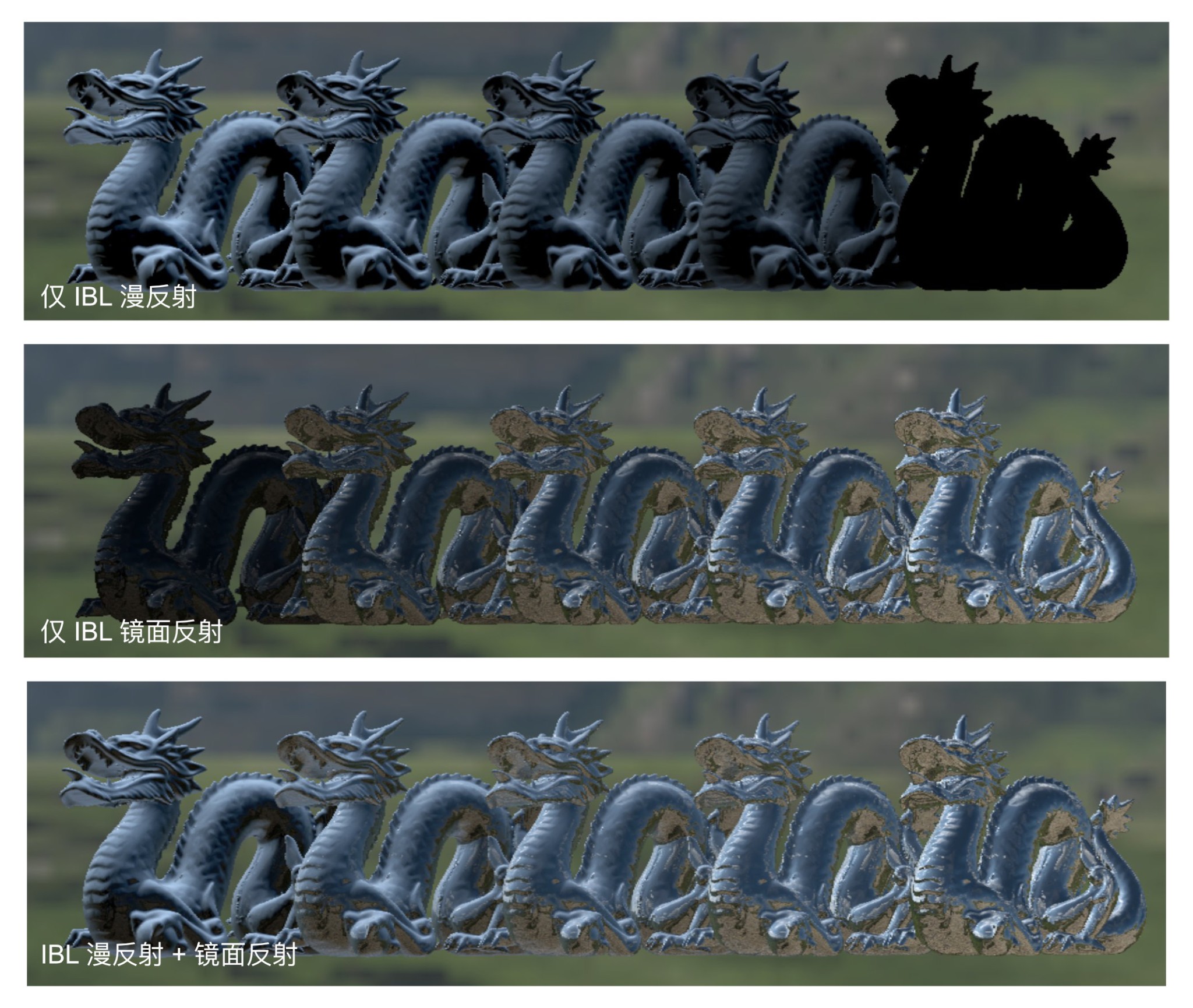
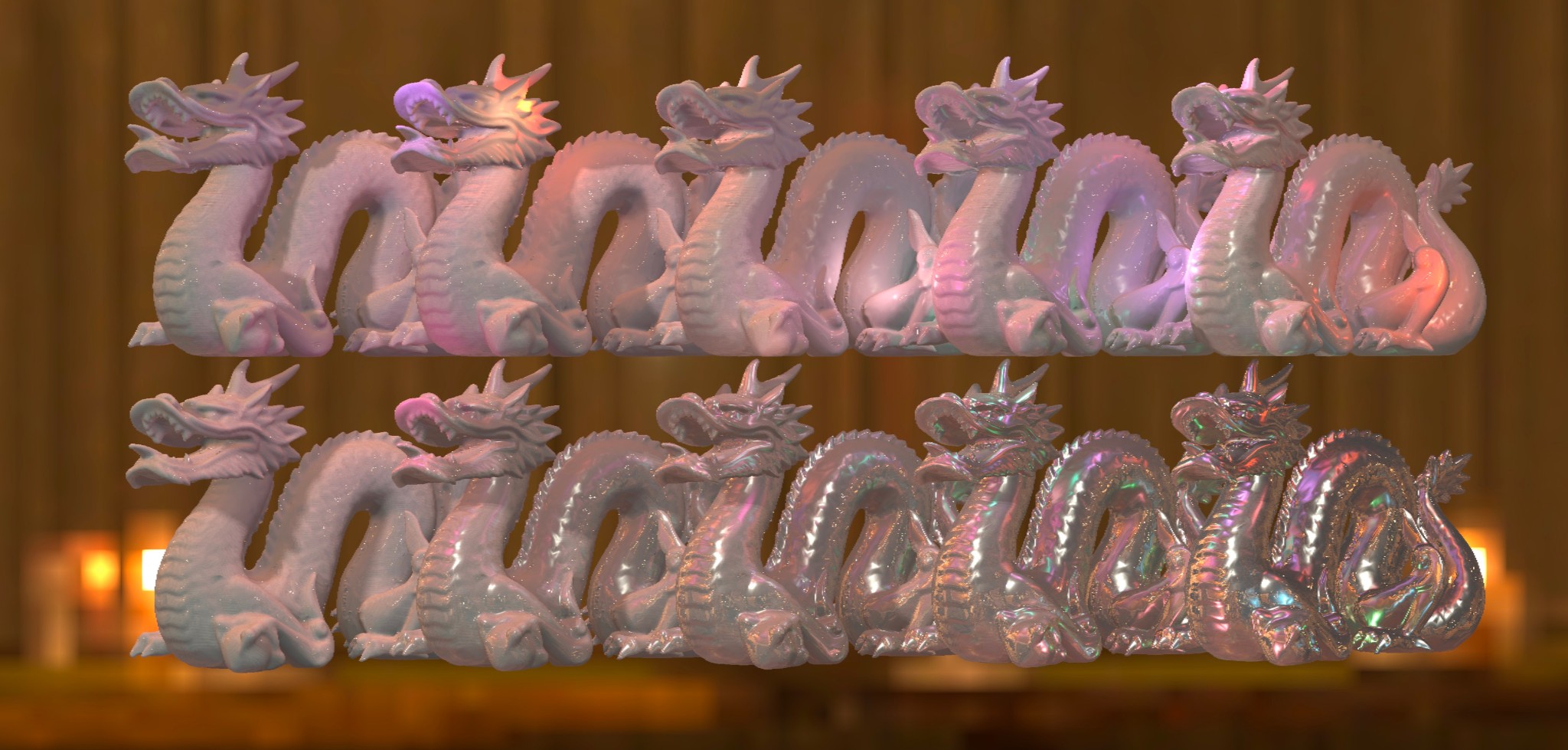
Implementing transparent rendering
Managing transparent and opaque objects during import
Identifying transparent and opaque objects during model import is very important, because opaque objects use the deferred rendering pipeline for better rendering efficiency. Many 3D applications do not offer fine-grained control over every object's transparency tag on export. As a result, even an opaque object in a model file may be exported with its blend mode set to Blend, a tag normally used for transparent objects. This renderer therefore uses an AlphaMode enum to mark the material's blend mode. If the material's AlphaMode is Opaque, the object is rendered during the opaque stage. If the material's AlphaMode is Blend, the object is rendered during the transparent stage. When importing a model, the renderer determines the material's blend mode by inspecting the transparency of its textures. If a texture has an alpha channel and any pixel's alpha is not 1.0, it contains transparent pixels, so the material's blend mode is marked as Blend; otherwise, it is Opaque. On each rendered frame, the renderer filters objects for the corresponding stage according to their blend mode.
Transparent rendering pipeline and shading
In the rendering flow, transparent objects are rendered after the deferred rendering of opaque objects. Because of their properties, transparent objects do not use deferred rendering. The transparent rendering pipeline also does not write depth. This avoids incorrect occlusion relationships and ensures that depth can be retrieved correctly when needed during post-processing. Since depth is not written, transparent objects need a correct front-to-back relationship. The renderer first sorts the objects by position on the GPU side, then renders the transparent objects one by one from farthest to nearest relative to the camera. This distance is obtained by transforming each transparent object's world coordinates with the view-projection matrix and taking z. Below is the Rust code for this process:
for (renderer, ...) in q_objects.iter().sort_by::<&WorldTransform>(|a, b| {
    let result_a = camera.view_proj * a.position.with_w(1.0);
    let result_b = camera.view_proj * b.position.with_w(1.0);
    if result_a.z > result_b.z { Ordering::Less } else { Ordering::Greater }
}) {
  ...
  draw_transparent(...);
}
For shading, this software introduces an object opacity parameter, stored in the Alpha channel of the object's base color texture and color property. During shading, the shader blends according to the Alpha value. Transparent objects still use the Cook-Torrance microfacet model. For transparent objects, the specular term describes light reflected by the object, while the diffuse term describes light that enters the object and is reflected or transmitted after being sufficiently absorbed. Thus, the diffuse term is affected by opacity, while the specular term is not. During shading, the renderer only blends the diffuse term according to Alpha; the specular term is unaffected by Alpha and is added directly. The blending algorithm is Alpha blending: a weighted average using 1 - Alpha as the source pixel's weight and Alpha as the overlaid pixel's weight. During transparent object shading, the source pixel color is sampled from the previous rendering stage's target texture, and the overlaid pixel color is calculated using the microfacet model. Below is the Wgsl code for this software's transparent rendering blend:
let diffuse_color: vec3<f32>;
let specular_color: vec3<f32>;
... // 平行光与IBL的光照着色计算
let prev_color4 = textureSample(rendered_image, rendered_sampler, uv);
let alpha = base_color4.a;
return vec4f(diffuse_color * alpha + prev_color4.xyz * (1.0 - alpha) + specular_color, 1.0);
Screen-space refraction
The basic idea of simulating refraction in screen space is to use the previous rendering stage's target texture as input. A direction vector is obtained by projecting the model normal onto the XY plane in normalized device coordinates, then used to offset the UV for sampling the previous stage's target. This offsets the sampled pixel position according to the object's normal. The result approximates a relatively realistic refraction effect.
A texture cannot be read and written simultaneously within a shader stage, so a Wgpu fragment shader cannot both sample a color rendering target texture and output to that same texture. But screen-space shading needs to sample the previous rendering stage's result.
To solve this problem, the software uses a "ping-pong" rendering target management pattern. While the renderer is running, the program maintains two color rendering target textures. When a rendering stage needs the previous stage's result as input, it swaps the two textures, using the former output texture for sampling and the former sampling texture as output. This ensures that it never needs to read and write the same texture simultaneously. More specifically, the program maintains an array of pointers to the two textures and a thread-safe static LazyLock<AtomicUsize> variable to implement ping-pong target indexing and storage. The atomicity of AtomicUsize ensures that multithreaded access to this index does not cause data races, providing safety during multithreaded execution.
pub static COLOR_TARGET_INDEX: LazyLock<AtomicUsize> = LazyLock::new(|| AtomicUsize::new(0));Refraction shading itself takes place in the fragment shader. There, the software obtains a direction vector by projecting the model normal onto the XY plane in normalized device coordinates. Below is the Wgsl code for calculating the refraction UV, where refrac is the refraction strength:
let normal_ndc = normalize((camera.view_proj * vec4<f32>(normal, 1.0)).xyz);
let uv = frag_coord.xy / global.screen_resolution - normal_ndc.xy * refrac;
Screenshots
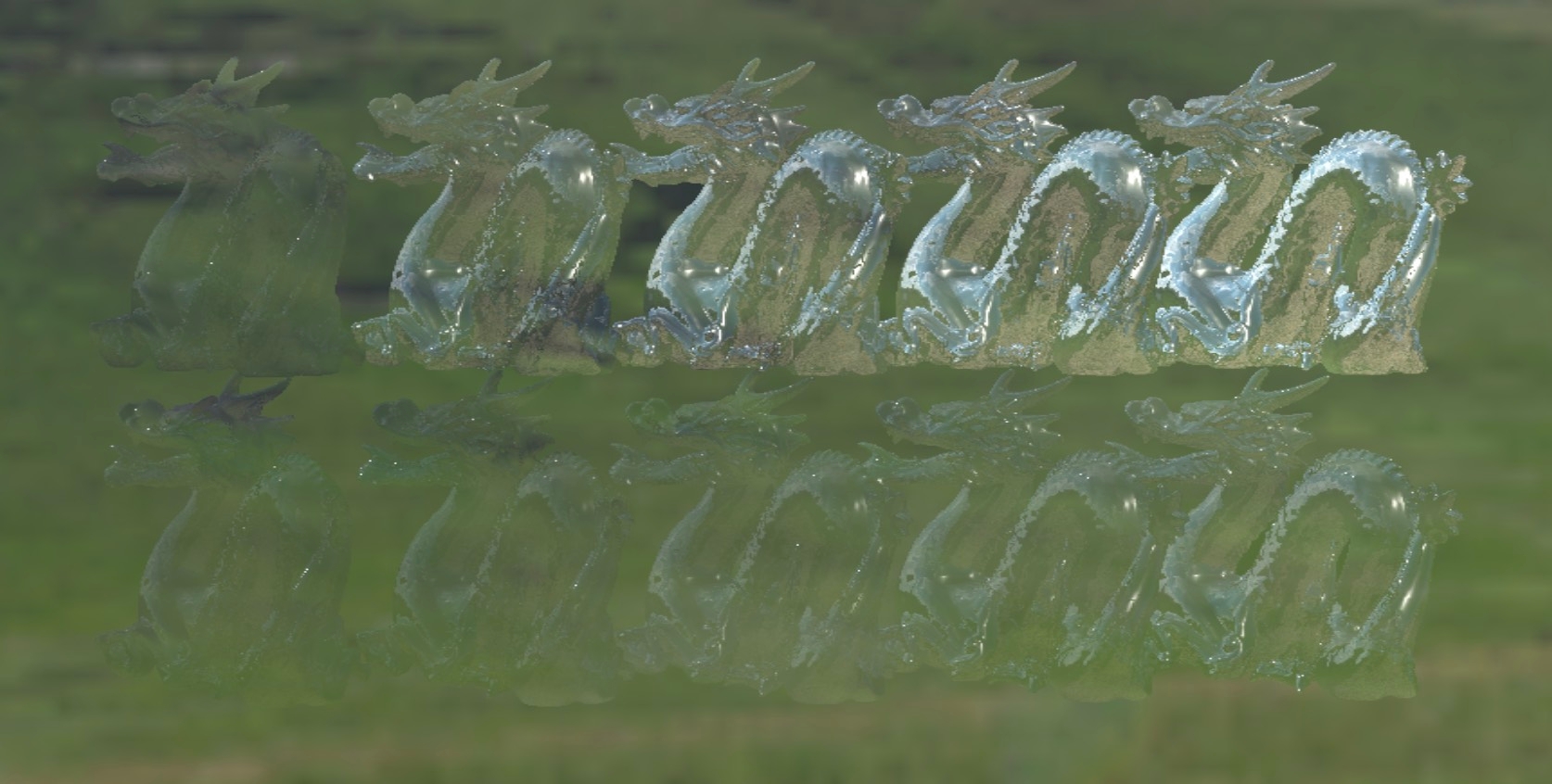
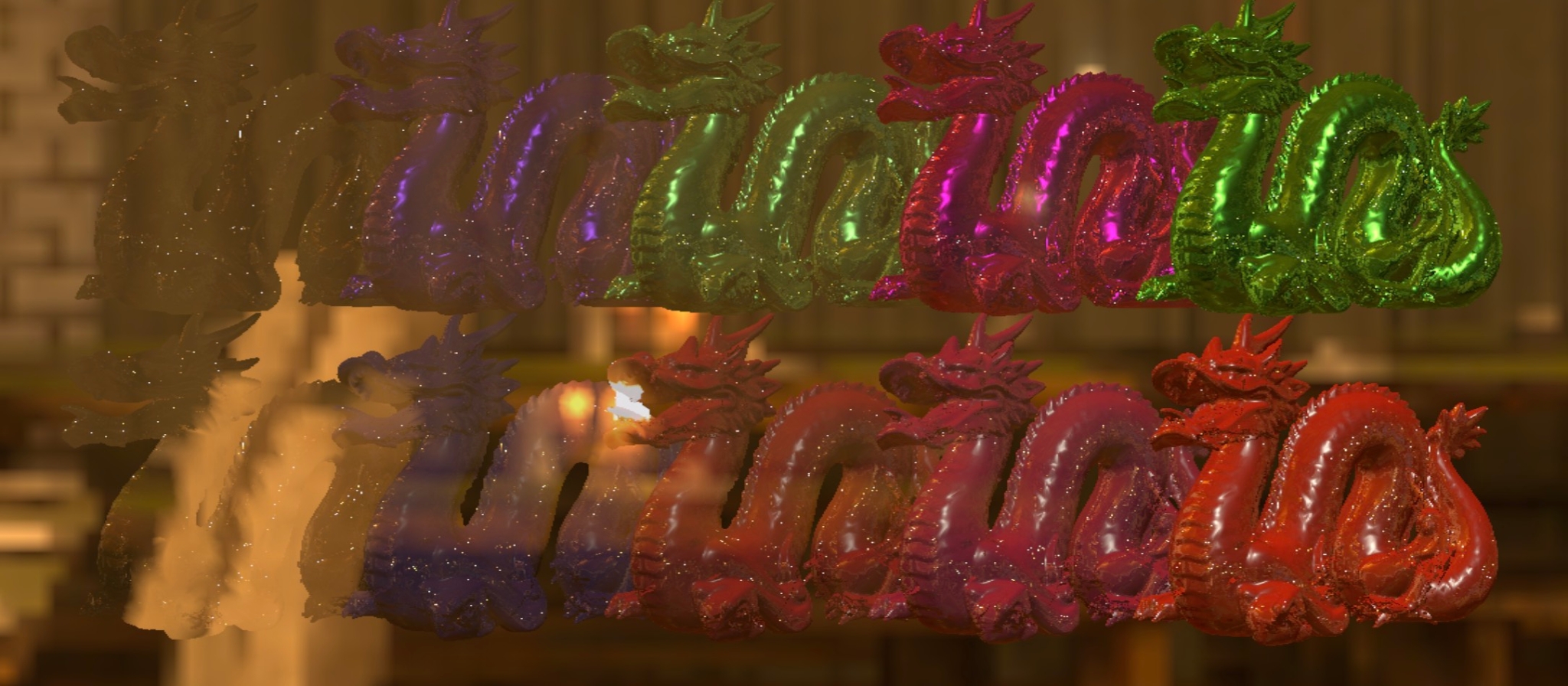
Appendix
Wgsl implementation of GGX importance sampling
fn importance_sample_ggx(xi: vec2<f32>, normal: vec3<f32>, roughness: f32) -> vec3<f32> {
    let a = roughness * roughness;
    let phi = 2.0 * 3.1415926 * xi.x;
    let cos_theta = sqrt((1.0 - xi.y) / (1.0 + (a * a - 1.0) * xi.y));
    let sin_theta = sin(1.0 - cos_theta * cos_theta);
    var half: vec3<f32>;
    half.x = cos(phi) * sin_theta;
    half.y = sin(phi) * sin_theta;
    half.z = cos_theta;
    let up = select(vec3f(0.0, 0.0, 1.0), vec3f(1.0, 0.0, 0.0), abs(normal.z) < 0.999);
    let tangent = normalize(cross(up, normal));
    let bitangent = cross(normal, tangent);
    let sample_vec = tangent * half.x + bitangent * half.y + normal * half.z;
    return normalize(sample_vec);
}
References
-
Real Shading in Unreal Engine 4: https://cdn2.unrealengine.com/Resources/files/2013SiggraphPresentationsNotes-26915738.pdf
-
Physics Rendering in Fliment: https://google.github.io/filament/Filament.md.html