Deferred Rendering Pipeline, Microfacet BRDF, Normal Transformation, and Object Hierarchy UI
2025-01-25
Auto translated into English by AI.
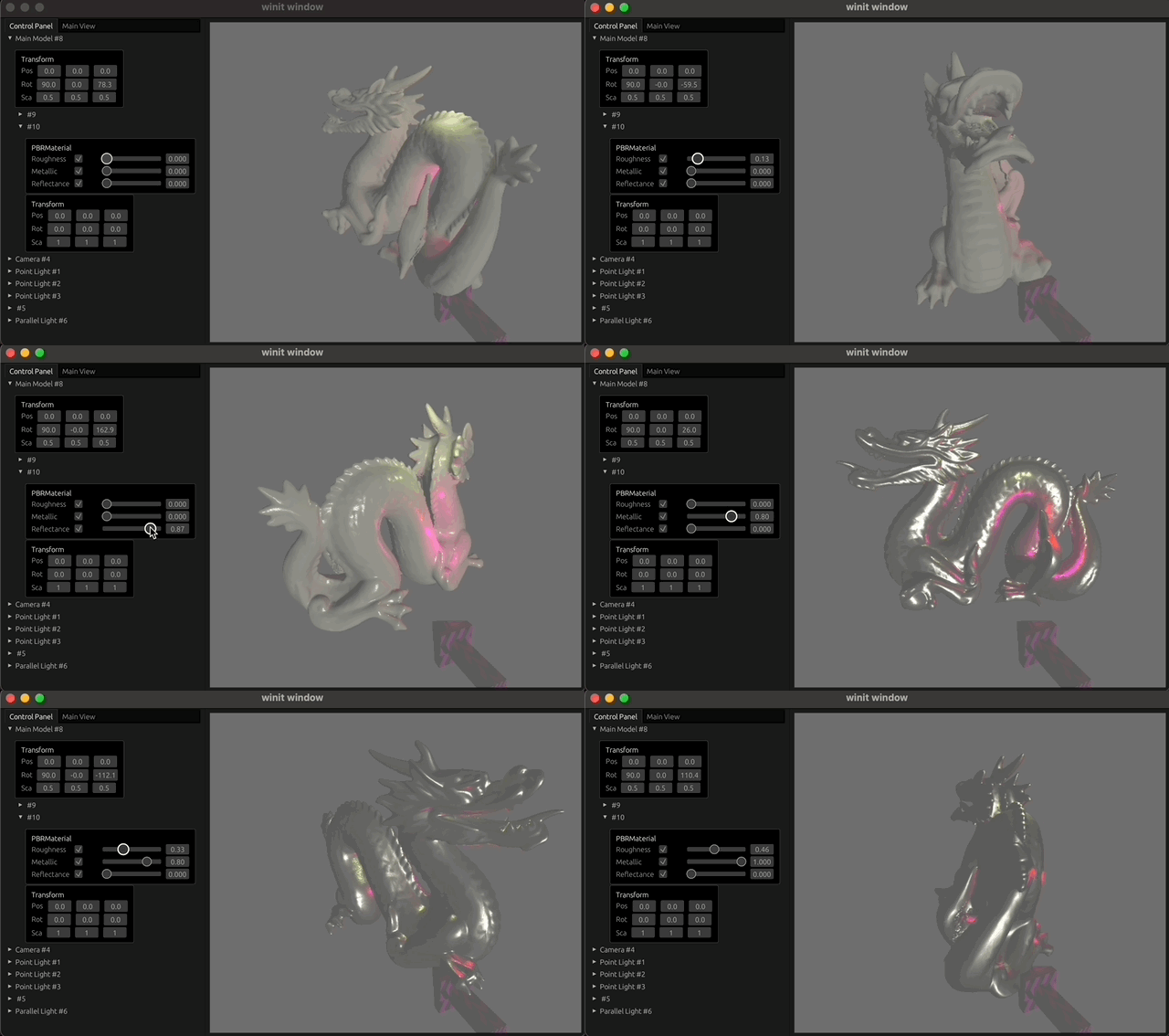
Normal transformation
Normal transformations are affected by the model's rotation and scale. But scaling can make the normal transformation incorrect, so we can't directly use the combined model scale and rotation transformation. This article by Jason L. McKesson explains the reasoning behind the normal transformation matrix and how to calculate it. I'll give the conclusion directly here:
$$ N_{ormal} = (M_{scale\_rotation}^{-1})^T $$
This formula involves inverting a matrix. How can we do that safely and quickly?
Below, I'll use the
./symbol, as inA ./ B, to mean this operation: take the reciprocal of every nonzero element of B, then multiply it elementwise by A.
-
Since rotation and scale transformations can both be expressed as 3x3 matrices, our normal transformation matrix only needs to be 3x3. All matrices in the rest of this section are 3x3.
-
A rotation matrix (called R below) is invertible. Its inverse equals its transpose, so inverting a rotation matrix is safe:
invert(R) = transpose(R). -
A scale matrix (called S below) is a diagonal matrix. It is invertible when its diagonal elements are nonzero, and the result is the reciprocal of each element:
invert(S) = 1 ./ S. -
From the properties of matrix product inverses and transposes, we have:
$$ \begin{cases} S^{-1} = 1\ ./\ S \\ R^{-1} = R ^ T \\ M^T=(RS)^{-1}=S^{-1}R^{-1} \\ N_{ormal} = (M^{-1})^T \end{cases} \\ \ \\ \implies N = (S^{-1}R^{-1})^T=(R^{-1})^T (S^{-1})^T=(R^T)^T(1./S)^T $$
The final result is:
$$ N_{ormal} = R\ ./\ S $$
Code implementation:
const MIN_SCALE: f32 = 0.001;
pub fn model_normal_matrix(&self) -> (Mat4, Mat3) {
    let translation = Matrix4::from_translation(self.position);
    let scale = Matrix4::from_nonuniform_scale(self.scale.x, self.scale.y, self.scale.z);
    let rotation = Matrix4::from(self.rotation);
    #[rustfmt::skip]
    let scale_t = Matrix3::new(
        1. / self.scale.x.max(Self::MIN_SACLE), 0.0, 0.0,
        0.0, 1. / self.scale.y.max(Self::MIN_SACLE), 0.0,
        0.0, 0.0, 1. / self.scale.z.max(Self::MIN_SACLE)
    );
    let model_matrix = translation * rotation * scale;
    let normal_matrix = Matrix3::from_cols(
        rotation.x.truncate(),
        rotation.y.truncate(),
        rotation.z.truncate(),
    ) * scale_t;
    (model_matrix, normal_matrix)
}
Deferred rendering pipeline
The project's deferred rendering pipeline currently renders a set of geometric data used for lighting into a set of textures (usually called the Geometry Buffer <G-Buffer>), then samples them and calculates pixel colors in the computation Pass.
Write G-Buffer Pass
So we need a Pass that writes the geometric information we need into multiple G-Buffer textures. wgpu supports rendering to multiple targets: the fragment shader's output can be set to multiple targets. Specifically, when creating the rendering pipeline, we need to specify targets (an array of Option<ColorTargetState> values, where ColorTargetState declares the target's texture format, blend mode, and write mask).
fragment: Some(wgpu::FragmentState {
  module: &shader,
  entry_point: "fs_main",
  targets: &targets, // &[Option<ColorTargetState>]
  compilation_options: wgpu::PipelineCompilationOptions::default(),
}),
The Write G-Buffer rendering targets currently consist of four Rgba8Unorm parameters. The layout and wgsl are shown below:
| Targets | Texture Format | |
| 1 | World Pos Tex | Rgba8Unorm |
| 2 | Normal Tex | Rgba8Unorm |
| 3 | Base Color Tex | Rgba8Unorm |
| 5 | PBR Parameters Tex | Rgba8Unorm |
// write_g_buffer.wgsl
struct FragmentOutput{
    @location(0) world_pos: vec4<f32>,
    @location(1) normal: vec4<f32>,
    // For PBR
    @location(2) base_color: vec4<f32>,
    @location(3) pbr_parameters: vec4<f32>, // 0: Metallic, 1: Roughness, 2: Reflectance, 3: Ambient occlusion
}
...
@fragment
fn fs_main(in: VertexOutput) -> FragmentOutput {
...
Main Pass
Once we have textures containing the geometric information, we can use them in any subsequent Pass. The main Pass in a deferred rendering pipeline is sometimes called the Compute Pass because it's often implemented with a Compute Shader. This is useful for light culling. I haven't done that yet; it's something to optimize later. I've implemented it directly with a full-screen Vertex Shader.
Full screen vertex shader
Our only input is vertex_index: u32, a built-in shader input declared with @builtin(vertex_index).
@vertex
fn vs_main(
    @builtin(vertex_index) vertex_index: u32,
) -> VertexOutput {
    let uv = vec2<f32>(f32(vertex_index >> 1u), f32(vertex_index & 1u)) * 2.0;
    let clip_position = vec4<f32>(uv * vec2<f32>(2.0, -2.0) + vec2<f32>(-1.0, 1.0), 0.0, 1.0);
    return VertexOutput(clip_position, uv);
}
In the rendering call, we don't need to specify a vertex layout or provide any Buffer. We only need to draw vertices numbered 0, 1, and 2. We use just three vertices, which work as shown below:
fn render(){
...
  render_pass.draw(0..3, 0..1);
...
}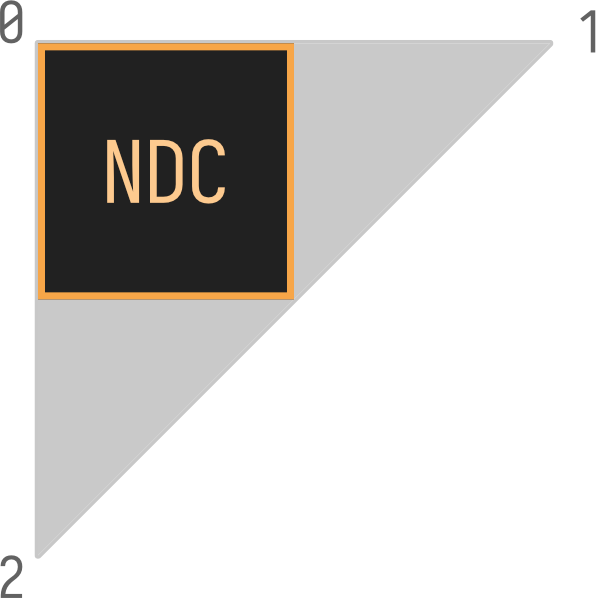
Front face: counterclockwise (CCW) in a left-handed coordinate system
Bindings
The G-Buffer parameters I pass to the main Pass are shown in the table on the right. All textures use No Filter (Nearest) and ClampToEdge sampling, so only one sampler is needed.
wgpu::SamplerDescriptor {
  address_mode_u: wgpu::AddressMode::ClampToEdge,
  address_mode_v: wgpu::AddressMode::ClampToEdge,
  address_mode_w: wgpu::AddressMode::ClampToEdge,
  mag_filter: wgpu::FilterMode::Nearest,
  min_filter: wgpu::FilterMode::Nearest,
  mipmap_filter: wgpu::FilterMode::Nearest,
  compare: None,
  lod_min_clamp: 0.0,
  lod_max_clamp: 100.0,
  ..Default::default()
}| 0: G-Buffer | |
| 0 | Sampler |
| 1 | World Pos Tex |
| 2 | Normal Tex |
| 3 | Base Color Tex |
| 5 | PBR Parameters Tex |
Point lights
Calculating point lights in the Shader requires two pieces of data: a Storage Buffer containing information about all point lights, and the total number of point lights for iteration.
Radiance of a Point Light
Below, I translate Radiance into Chinese as 辐射率. (https://zh.wikipedia.org/wiki/辐射率)
The radiance of a point light can be calculated as follows:
let radiance = intensity / ((decay * pow2(distance)) + 0.001);intensity and decay are properties of the light, and distance is the world-space distance from the light to the fragment. We recorded the world-space coordinates in the G-Buffer earlier. The + 0.001 is for division safety.
Iterating over lights
The number of point lights is stored in a vector in a global lighting-related Binding: light.lights_nums.x. The other components are intended to store the counts of other types of lights.
    let point_lights_num = light.lights_nums.x;
    for (var i = 0u; i < point_lights_num; i += 1u) {
        let li = point_lights[i];
        let world2light_unnorm = li.position.xyz - world_pos;
        let world2camera_unnorm = camera.position - world_pos;
        let dist = length(world2light_unnorm);
        if dist > li.distance { continue; }
        let dir = normalize(world2light_unnorm);
        let radiance = li.intensity / ((li.decay * pow2(dist)) + 0.001); // + 0.001 for division safety
        surface_color += calculate_light(
            li.color.xyz,
            radiance,
            surface,
            dir,
            normalize(world2camera_unnorm),
        );
Microfacet BRDF
My theoretical grounding isn't solid enough, and there are plenty of good resources on the theory, so I won't explain microfacet model theory here. I'll list resources in the references at the end.
The hard part of implementing a microfacet model is finding a detailed set of parameter conventions and how they map to the actual calculations. For example, the microfacet model's calculations don't directly contain a Metallic parameter (called metalness below). Metalness actually affects the Fresnel term. Many of the articles and videos I went through didn't explain this clearly. Fortunately, I eventually found a good reference. Following the filament engine's implementation, I set up these user-facing parameters (the parts implemented so far):
| Parameter | Type & Range |
| BaseColor | Linear RGB [0, 1] |
| Roughness | Scalar [0, 1] |
| Reflectance | Scalar [0, 1] |
| Metallic | Scalar [0, 1] |
BaseColor, Reflectance, and Metallic together determine the f0 term. Reflectance and Metallic currently only affect the f0 term, though diffuse is also affected by metallic. Also, to make the visual changes in roughness more intuitive, roughness can be squared.
let f0 = 0.16 * reflectance * reflectance * (1.0 - metallic) + baseColor * metallic;
let diffuse_color = (1.0 - metallic) * base_color;
...
fn perceptual_roughness_to_roughness(perceptual_roughness: f32) -> f32 {
    let clamped = clamp(perceptual_roughness, 0.089, 1.0);
    return clamped * clamped;
}
The table and algorithm come from Physically Based Rendering in Filament. See the original for the reasoning behind them.
A better Editor UI
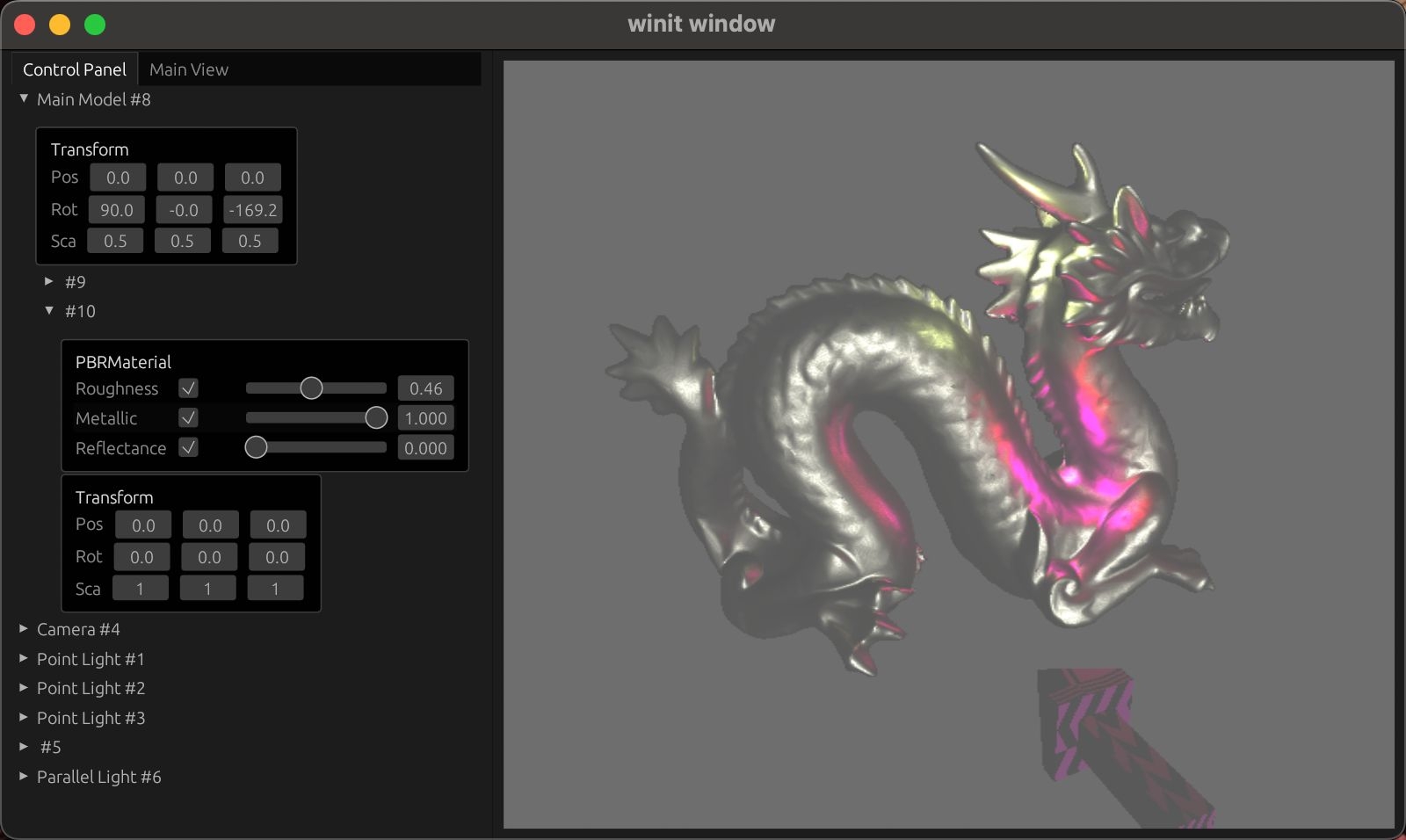
I've added UI for the world's object hierarchy and components, making it fairly convenient to control each object's components.
Material Override
I've added a material inheritance component to override the material of a particular Mesh. It can simply be attached to the MeshRenderer component. This also makes it easy to adjust material properties in the Inspector.
References
-
Romain Guy, Mathias Agopian - Physically Based Rendering in Filament https://google.github.io/filament/Filament.html An excellent, comprehensive PBR article that explains in detail how PBR is implemented in the filament real-time rendering engine.
-
Blender - Principled BSDF https://docs.blender.org/manual/zh-hans/3.5/render/shader_nodes/shader/principled.html
-
Boson (2020) - GraphicEngine-Tile-based Deferred Shading using Compute Shader https://myboson.wordpress.com/2020/05/29/graphicengine-tiled-based-deferred-shading-using-compute-shader/
-
Jason L. McKesson (2012) - Normal Transformation https://paroj.github.io/gltut/Illumination/Tut09 Normal Transformation.html