Getting Started with Unreal 5 C++ Multiplayer: Resources and Notes
2025-05-14
Auto translated into English by AI.
Things to Watch Out For
Launch the Editor from Rider
UE's C++ reflection-related code must be compiled before it can be used in the editor. I recommend launching the editor from Rider, which compiles it before starting UE.
Ctrl+S Doesn't Save Everything
The default shortcut for Save All is Ctrl+Shift+S. No matter how many times you press Ctrl+S, it only saves the current asset! Pressing Ctrl+S in a scene saves the current level, not everything. Also, all the save buttons save only the current asset, including the one in the scene tab. Remember to use Ctrl+Shift+S when you want to save everything.
Use Version Control
Be sure to use a version control tool to store your work. When you're getting started with UE, a forced shutdown, an engine crash, an incorrect undo, or accidentally saving an unwanted result can leave the project completely unusable.
Since UE keeps a lot of things in memory, when you want to roll back using version control:
-
Close the editor first without saving any changes.
-
Roll back the version.
-
Open the editor using Rider.
This lets you roll back safely.
Common UE Classes
This section describes some important, commonly used classes in UE. The headings generally run from base classes to derived classes.
UObject
UObject is the most basic UE class that participates in reflection and garbage collection. It has two important subclasses:
-
AActor
-
UActorComponent
Class names usually start with U to indicate a class derived from UObject, or A to indicate one derived from AActor. Below is a brief introduction to these two classes and UObject's garbage collection mechanism.
AActor
AActor is the parent class for objects that can be placed in a scene. Specifically, it has transform properties (rotation, scale, position, etc.) as well as networking capabilities.
Reference (official documentation): https://dev.epicgames.com/documentation/en-us/unreal-engine/unreal-engine-actor-lifecycle
-
Full lifecycle diagram
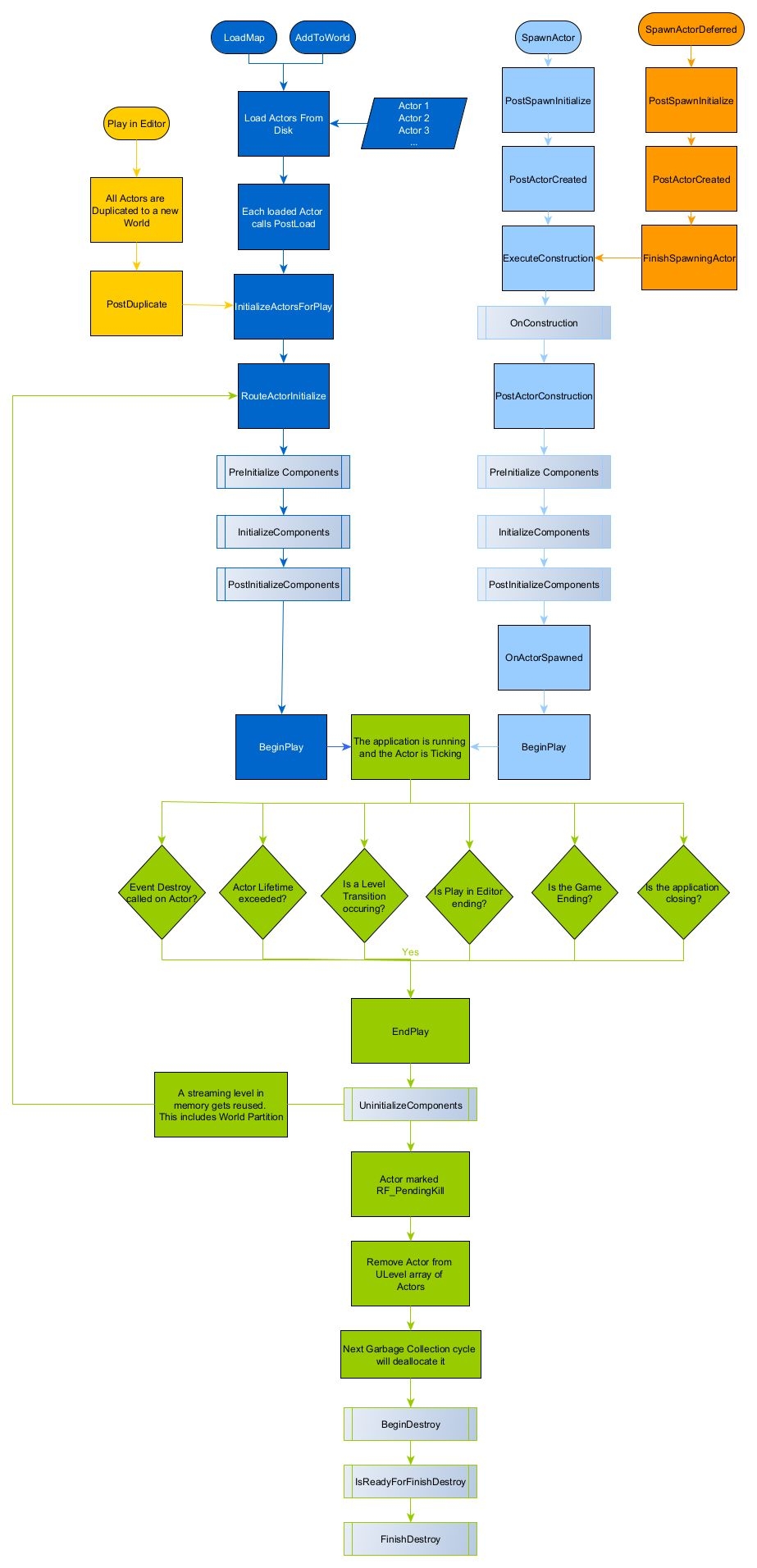
Some key points (in order):
-
BeginPlay(called when the Level begins) -
EndPlay(called in Destory) -
Tick(updated every frame) -
BeginDestroy(related to garbage collection, usually used to free memory or handle multithreaded resources) -
FinishDestory(related to garbage collection; this is the last call before aUObjectis freed)
APawn
APawn represents controllable entities, such as players and NPCs. It is a subclass of AActor.
https://dev.epicgames.com/documentation/en-us/unreal-engine/API/Runtime/Engine/GameFramework/APawn
UActorComponent
UActorComponent is an important class. It is the only route for player visuals, audio, and interaction such as rendering meshes, images, collisions, and sound, and is also a major home for game logic. Below, I'll refer to Components as "components."
Components are attached to Actors and have no transform information. A component needs to be registered to work properly. Registration happens automatically when a component is used as a sub-object. You can also register it manually with the RegisterComponent function (but note that registering at runtime affects performance).
Registering a component triggers UActorComponent::OnRegister. It also triggers CreateRenderState and OnCreatePhysicsState. To unregister a component, use UnregisterComponent.
Here are some component functions and what they do:
-
PostLoad: triggered when a static Actor is loaded -
InitializeComponent: triggered when the component is first initialized -
BeginPaly: triggered when the Actor enters the game -
TickComponent: runs every frame -
EndPlay: triggered when the Actor is removed
MyComponent = CreateDefaultSubobject<UMyCustomComponent>(TEXT("MyComponentName"));
MyComponent->SetupAttachment(RootComponent); // RootComponent 是 Actor 的默认根组件
If a component needs physical properties, you can use its subclass USceneComponent. If it also needs physical collision or rendering capabilities, you can go further and use UPrimitiveComponent. Here are some common subclasses and their uses.
| Subclass | Functionality | Example Uses |
USceneComponent |
Provides spatial transforms and supports nested hierarchies (such as root and child components) | Character skeletons, camera spring arms |
UPrimitiveComponent |
Inherits from USceneComponent and supports physical collision and rendering (such as static meshes and particle systems) |
Weapon collision volumes, destructible objects |
UAudioComponent |
Inherits directly from UActorComponent and provides audio playback |
Background music, character footsteps |
UMovementComponent |
Implements physical movement logic (such as character movement and flying vehicles) | Character jumping, vehicle acceleration |
UE's Garbage Collection Mechanism
UE uses a mark-and-sweep garbage collection strategy. The idea is to first traverse the object graph (a directed graph containing references between objects) from the Root Set during the marking phase, marking every visited object as "reachable." Then, during the sweep phase, all objects are examined. If an object isn't marked reachable, it needs to be freed.
In UE, all UObject types and their subtypes participate in garbage collection. Actors need to be destroyed manually because they are always referenced by the scene and themselves. To destroy an Actor, call its Destroy function.
The following lists situations that create edges in the object graph.
All Hard References
-
Holding a raw C++ pointer marked with the
UPROPETYmacro
UPROPERTY()
UMyObjectClass* Foo;-
A UE container holding raw C++ pointers and marked with the
UPROPERTYmacro
UPROPERTY()
TArray<UMyObjectClass*> Foo;-
Root Set objects (you can add an object to the Root Set with
MyObject->AddToRoot()) -
Objects managed by
TStrongObjectPtr(noUPROPERTYneeded)
Certain Soft References
-
A new
UObjectdeclared inside aUFUNCTIONsurvives until the end of its lifetime (when the current function ends). -
Using a raw
UObjectpointer directly as a member variable in a struct or class -
Using a
TWeakObjectPtr<T>orTSoftObjectPointer<T>weak pointer as a member variable
Smart Pointers and Memory Management for Non-UObject Objects
Non-UObject objects don't support garbage collection, but UE also provides a memory management approach similar to the C++11 standard library: smart pointers. This section won't go into the features and workings of standard library smart pointers; you can read the relevant LEARN C++ chapter. The table below covers smart pointers for both non-UObjects and UObjects. Note that non-UObject smart pointers cannot be used with UObjects!
| Non-UObject Smart Pointer | Mechanism | Notes | Nullability | Standard Library Analogue |
TUniquePtr |
Ownership | - | Nullable | std::unique_ptr |
TSharedPtr |
Reference counting | - | Nullable | std::shared_ptr |
TSharedRef |
Non-null reference counting | Can be converted to TSharedPtr | Non-nullable | - |
TWeakPtr |
Weak reference, not counted | Used to resolve reference-counting cycles | Nullable | std::weak_ptr |
| UObject Smart Pointer | Mechanism | Notes | - | |
TStrongObjectPtr |
Reference counting | Protects a UObject from garbage collection | Nullable | - |
TWeakObjectPtr |
Weak reference, not counted | The weak-reference version of the above | Nullable | - |
Tips: Why does UE have its own set of smart pointers? UE's source code predates C++11. Having its own smart pointers also helps with multiplatform development. In addition, independent smart pointers offer benefits such as consistent naming. That's as far as my understanding goes.
References
Multiplayer Games and Network Synchronization
In a multiplayer game using a dedicated server model, the server stores the true game state, and most game logic runs on the server. After computing the results, the server synchronizes the necessary data to clients. Clients modify server data by sending data or making remote function calls (RPCs).
Replication is an important part of synchronization. The authoritative server (usually a dedicated server in large shooters) replicates state data to clients, which handle rendering and audio locally.
AActor is the first class that supports networking. Most replication behavior can be defined in Actors, which are also the main carriers of network-synchronized data. In addition, classes derived from UObject can be replicated correctly by attaching them to Actors. In multiplayer games, each connection is also bound to a Pawn and a PlayerController.
Actor Networking Properties
Ownership: Role and Remote Role
Who an Actor belongs to—that is, which machine holds the Actor's true state—is called ownership. The owner conditionally replicates to connected machines (depending on factors such as relevancy and dormancy). To see who owns an Actor, use AActor::GetLocalRole and Remote Role.
-
Local Role represents the current machine's authority over the Actor.
-
Remote Role represents the remote machine's authority over the Actor.
| ROLE_None | This Actor is not replicable | Local Role | Remote Role |
| ROLE_Authority | The current machine owns the Actor and holds its true state | Server | Client |
| ROLE_SimulatedProxy | The current machine only simulates the Actor; its true state is read-only, and remote functions cannot be called | Client | None |
| ROLE_AutonomousProxy | Although the current machine simulates the Actor, it can change its true state and call remote functions | Client | Server |
In a server-client model, an Actor's ownership is controlled by the server, and clients cannot change any Actor's owner. Also, in this model, the remote machine for a client is the server, and the remote machine for the server is a client.
Priority
An Actor's NetPriority variable is a floating-point number representing its priority. Higher-priority Actors get more bandwidth. You can change an Actor's priority by overriding GetNetPriority. Priority is also a dynamic variable affected by various parameters, such as the viewer's position and direction, the time since the Actor was last replicated, and so on.
Replication
Actors need to be replicated from the server to clients, but not everything needs to be sent. The code and comments below describe the process of declaring and registering replicated fields.
AMyActor::AMyActor()
{
  bReplicates = true; // 启用 Actor 的复制
  ...
}#pragma once
#include "CoreMinimal.h"
#include "GameFramework/Actor.h"
#include "MyActor.generated.h"
UCLASS()
class HELLOUNREAL_API AMyActor : public APawn
{
GENERATED_BODY()
public:
AMyActor();
UPROPERTY(EditAnywhere)
AMyActor* Friend;
// ========== Replication ==========
/// 要想声明一个可以被复制的变量,首先需要使用 Replicated 或 ReplicatedUsing(见下)标签
/// 接着还必须在 GetLifetimeReplicatedProps 注册要复制的变量(见下)
UPROPERTY(Replicated)
bool IsSleeping;
/// @c ReplicatedUsing 为复制提供了一个声明回调的机会,
/// 这个功能被称作 "RepNotify"。
/// 在这个例子中,@c OnRep_OwnedCatsCount 会在客户端成功收到变量的复制值时运行。
/// 需要注意的是,这个在回调中并不需要执行赋值,赋值在注册后是自动的。
/// 回调函数会在被复制赋值之后被触发。
UPROPERTY(ReplicatedUsing=OnRep_OwnedCatsCount)
int OwnedCatsCount;
/// 所有有复制变量的 Actor 都需要重载该函数,其作用是注册需要网络复制的变量。
///
/// 其会被在 Actor 被创建并加入网络时被触发,用于构建网络同步的元数据;
/// 通常在服务端,是服务器生成 Actor 时调用此函数。
///
/// 使用该函数务必首先调用 @c Super::GetLifetimeReplicatedProps 以确保父类的内容被注册
void GetLifetimeReplicatedProps(TArray<FLifetimeProperty>& OutLifetimeProps) const override;
protected:
UFUNCTION()
void OnRep_OwnedCatsCount();
};Relevancy
A level can be very large, and we only want Actors relevant to the player to update. UE provides a relevancy mechanism: only Actors relevant to a particular network connection are replicated. Also, Actors that aren't relevant to the current client are destroyed on that client.
The network driver automatically calls AActor::IsNetRelevantFor to determine whether an Actor is relevant to a connection. To force relevancy, use AActor::ForceNetRelevant. Here are the default relevancy conditions:
-
Forced relevancy conditions An Actor is always relevant (synchronized to the client) if any of the following conditions are met:
-
The Actor is marked
Always Relevant. -
The Actor belongs to the current connection's controlled object:
-
It is the current connection's
Pawn. -
It is owned (
OwnedBy) by the current connection'sPawnorPlayer Controller. -
The Actor is the instigator of an action triggered by the current connection's
Pawn(such as the Instigator of noise or damage).
-
-
Owner-dependent relevancy The Actor's relevancy is determined by its Owner if the following conditions are met:
-
The Actor has an Owner set (through
SetOwner). -
The Actor has
bNetUseOwnerRelevancyenabled (use the Owner's relevancy settings).
-
-
Forced irrelevancy conditions An Actor is always irrelevant if any of the following conditions are met:
-
The Actor is only relevant to its Owner (
bOnlyRelevantToOwner=true), and: -
It has no Owner or the Owner itself is irrelevant.
-
The Actor is hidden (
bHidden=true). -
The Actor has no Root Component, or its Root Component has collision disabled (
CollisionEnabled=NoCollision).
-
-
Relevancy based on skeletal attachment If the Actor is attached to another Actor's skeleton (such as a weapon equipped by a character):
-
Use the attached-to Actor's base relevancy rules (the attachment target's network relevancy determines its relevancy).
-
-
Distance relevancy (optional) If distance-based relevancy is enabled (through
AGameNetworkManager::bUseDistanceBasedRelevancy):-
The Actor is relevant when it is within the client's view distance (based on
NetCullDistanceSquared), and irrelevant otherwise.
-
Rule Priority
-
Forced relevancy conditions have the highest priority (such as
Always Relevant). -
Forced irrelevancy conditions come next (such as being hidden or having no Root Component).
-
The remaining conditions are checked in order, with the final result determined by distance or the attachment target's relevancy.
Debugging Suggestions
-
Use the console command
VisualizeNetworkRelevancyto visualize relevancy ranges. -
Check the Actor properties:
bAlwaysRelevant,bOnlyRelevantToOwner, andNetCullDistanceSquared.
Network Dormancy
Dormancy is a manually managed network optimization mechanism. Dormant Actors aren't replicated and aren't destroyed on clients because of relevancy. Also, don't modify a dormant Actor's replicated data, as this can cause data loss.
The dormancy property is stored in AActor::NetDormacy and can be changed through AActor::SetNetDormancy.
NetDormacy has the type TEnumAsByte<enum ENetDormancy>. The ENetDormancy enum contains:
-
DORM_Never: never dormant -
DORM_Awake: awake -
DORM_DormantPartial: dormant for some connections; useAActor::GetNetDormancyto find out which connections it is dormant for -
DORM_DormantAll: dormant for all connections -
DORM_Intial: initially dormant for all connections
Typical usage:
AActor::SetDormancy(ENetDormancy::DORM_Awake); // 唤醒
AActor::FlushNetDormancy(); // 唤醒
AActor::SetDormancy(ENetDormancy::DORM_DormantAll); // 休眠
RPC: Remote Procedure Calls
Besides replication and replication callbacks, UE also supports RPC for communication between the two sides. Simply put, RPC lets developers make one machine call certain functions on another. Specifiers indicate where a function runs; for example, Server means the function runs on the server. Here's a short list.
| Specifier | Runs On | Notes |
| Client | Client | All clients with an owning connection on this Actor |
| Server | Server | Can only be called on the client that owns this Actor |
| Remote | Remote machine | |
| NetMulticast | Clients and server | The server and all clients relevant to this Actor |
  /// RPC 远程函数调用,可以实现跨端调用函数的功能。
  /// @c Reliable 标签声明了这此调用一定要被抵达,不管带宽情况如何;
  /// 默认的可靠性是 Unreliable.
  /// @c WithCalidation 提供了简单的程序验证,通过实现对应的 XXX_Validate 函数实现
  UFUNCTION(Server, Reliable, WithValidation)
  void ServerRequestPetCat();
  UFUNCTION(Client)
  void ClientPlayPetCat();
  UFUNCTION(NetMulticast)
  void NetMulticastRPC();
When implementing RPC functions, the function names are different:
void AMyActor::ServerRequestPetCat_Implementation() { ... }
bool AMyActor::ServerRequestPetCat_Validate() { ... }
To use an RPC function, just call its original declaration (its original name). Here's an example of letting your friend pet your cat:
❌ Incorrect example
UPROPERTY(Replicated)
AMyActor* Friend;
void LetMyFriendPetMyCat() {
  Friend->ServerRequestPetCat();
}
void ServerRequestPetCat_Implementatoin() {
  ClientPlayPetCat()
}
A Server RPC can only be called from the connection that owns that Actor. You don't have permission to call an RPC on your friend's Actor, so the code shouldn't call Friend's RPC function directly. Another problem is that even though Friend is marked Replicated, it can still be null because replication has a delay. Check it before use.
✔️ Correct example
void LetMyFriendPetMyCat() {
    ServerRequestLetMyFriendPetCat();
}
void ServerRequestLetMyFriendPetCat_Implementation() {
    if (IsValid(Friend) && TargetFriend->GetOwner() == GetOwner()) {
        Friend->ClientPlayPetCat();
    }
}
We use an Actor on our own connection to send the RPC to the server, rather than making our friend's Actor send the pet-cat request from our connection.
Debugging Suggestions
The editor's multiplayer debugging menu is located here:
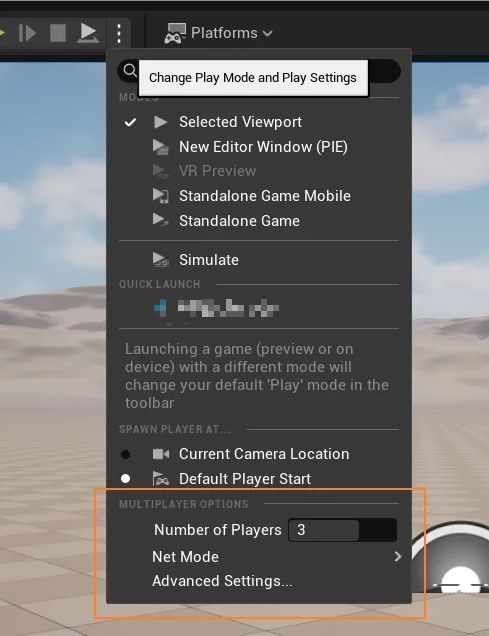
Changing Scenes
Recommended reading, from the official documentation: https://dev.epicgames.com/documentation/zh-cn/unreal-engine/travelling-in-multiplayer-in-unreal-engine
Profiling
The profiling menu can be opened through the options in the editor's lower-right corner.
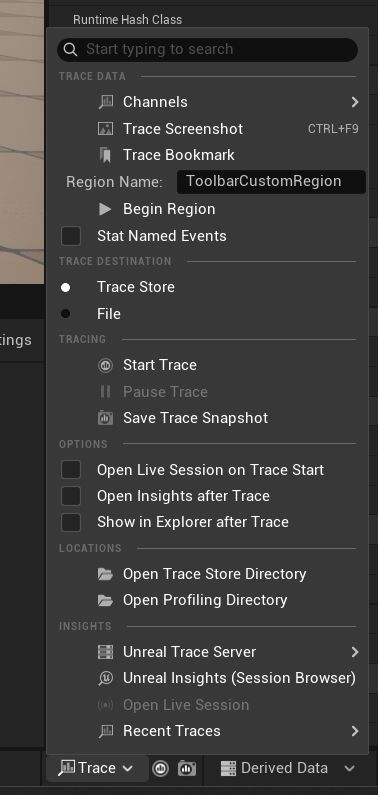
Clicking the Unreal Insights (Session Browser) option opens several debugging tabs.
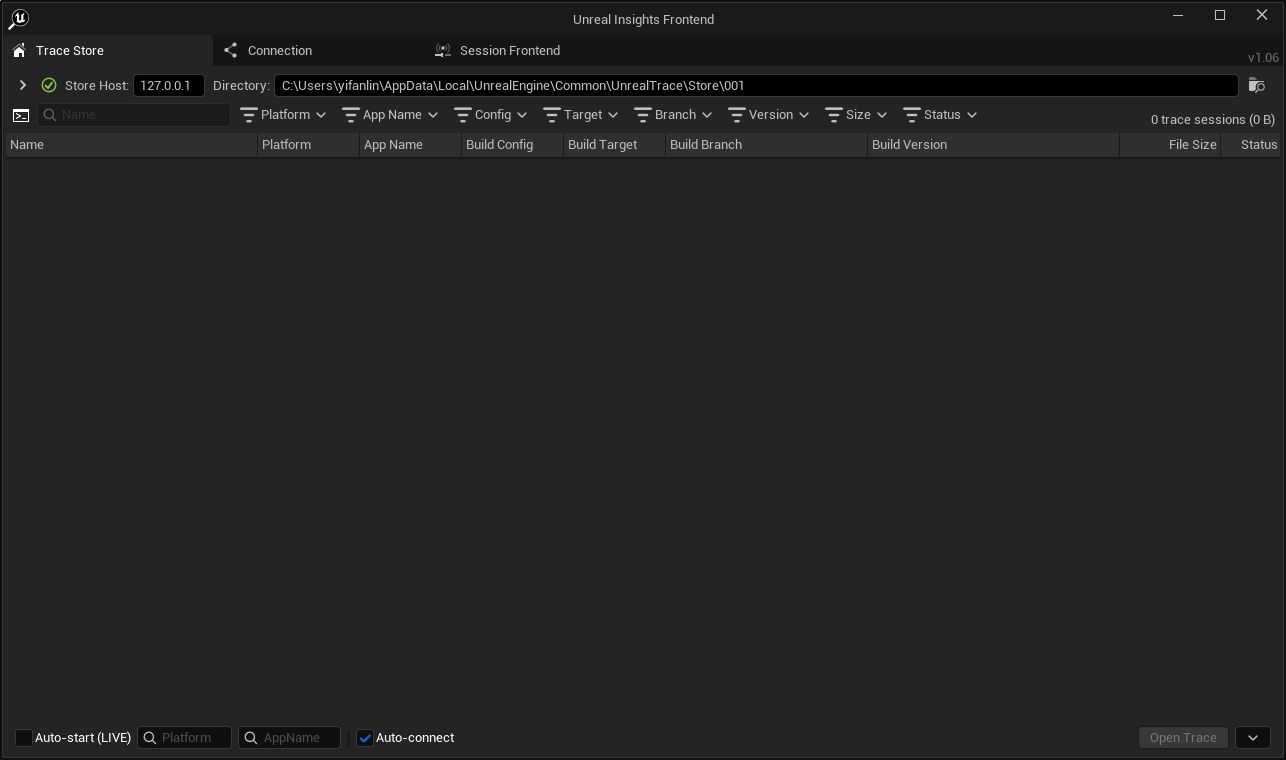
Click the record button to start recording, then click it again to stop.
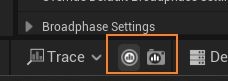
Once recording is finished, Unreal Insights shows the recorded data. Double-click it to view the profiling data.
References
-
How to Optimize Performance in Unreal Engine 5 https://youtu.be/lfjG3z5VVIw
Other Commonly Used APIs
-
Type casting
UBar* Parent;
...
UFoo* Child = Cast<UFoo>(Parent);-
To call a parent class's functionality from a subclass, use
Super, such asSuper::Foo(). -
Checking whether a pointer is valid (whether it is null):
UPROPERTY()
UMyClass* ReflectedPtr;
UMyClass* NotRefletedPtr;
...
// For reflected pointer (UPROPERTY)
IsValid(ReflectedPtr);
// For not reflected pointer
NotReflectedPtr->IsValidLowLevel()-
Pointer nullability: only pointers to
UObjectvariables marked withUPROPERTY()default to null when uninitialized. UnmarkedUObjectpointers, however, should not be null. To check whether a raw pointer not marked withUPROPERTY()is null, useIsValidLowLevel. -
To require a variable to use a subclass, use
TSubclassOf<T>. -
Creating instances: UObject and its subclasses only support no-argument constructors for object creation.
NewObject<T>(...)is the simplest factory method for creating a UObject.NewNamedObject<T>(…)lets you specify a name (FName).